
절대바이러스아닙니다믿어주세요.exe
대학교 수강신청 사이트 과목 크롤링 본문
나는 바보라서 좀 헤맷기 때문에 나처럼 바보인 사람들을 위해 글을 작성한다.
고려대 수강신청 사이트를 기준으로 설명한다.
주의할점!!
크롤링은 불법이아니다
단, 수집한 데이터를 상업적으로 이용하는 경우, 상대 서버에 문제를 일으킬 경우 ㅈ될수도있다
순서는 다음과 같다
1.학과를 가져온다
2.학과별로 전공,교양,학문의 기초 등을 가져온다
3.전공>학과>과목, 교양>학과>과목, 학문의기초>학과>과목 순서로 모든 과목을 긁어온다
최종 json파일엔 과목 정보들만 저장할것이다
그리고 학문의기초,교양은 귀찮으니 건너뛸거다
똑같은 방식으로 하면됨
우선 단과대는 몇개 안되니까 개발자 도구를 키고 response에서 단순하게 긁어올 것이다.
개발자 도구를 열어놓은 다음 과목조회를 들어가자. 모든 단과대를 가져오려면 전공 탭 기준이여야한다.
network tab에 들어가보자.
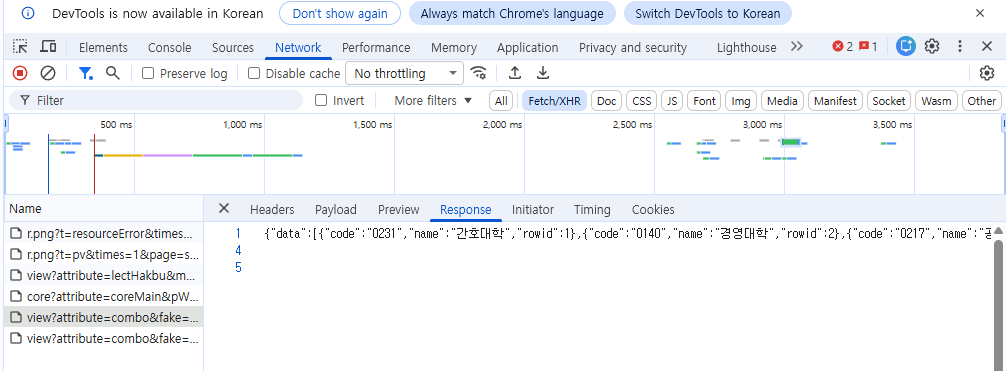
뭔가 많이뜬다..
다 들어가보자.
그러면 위와 같은 데이터를 찾을 수 있다.
rowid는 신경쓰지 않아도된다. 그냥 표시하는 순서임
univ.json으로 저장한다.
그리고 이제 학과를 가져오고싶다.
단과대 선택 탭에서 아무거나 골라보자.
네트워크 탭에 새로운게 생겼을 것이다.
payload 를 보자.
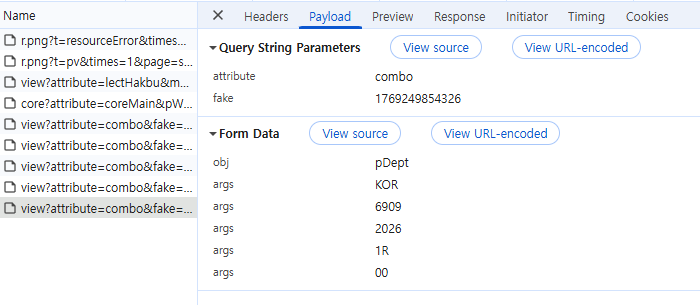
오오..뭔지몰르겟다..
그럼 다른 단과대를 한번 더 클릭해볼까
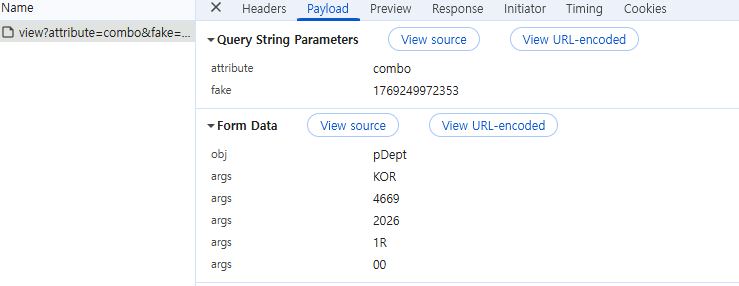
감이잡혔다
3번째 args에 과목코드를 넣으면 되는것이다
그럼 이제 단과대 별로 학부를 긁어오는 코드를 작성하자
import json
import requests
import time

# 1. 단과대 목록 불러오기 (경로가 맞는지 확인하세요!)
def load_college_codes(file_path):
    with open(file_path, 'r', encoding='utf-8') as f:
        content = json.load(f)
        return content.get('data', [])

college_list = load_college_codes('univ.json')

# 2. API 설정 (fake 값은 실제 브라우저에서 최신 것으로 업데이트 권장)
url = "https://sugang.korea.ac.kr/view?attribute=combo&fake=1769249972353"
headers = {
    "Accept": "*/*",
    "Content-Type": "application/x-www-form-urlencoded; charset=UTF-8",
    "X-Requested-With": "XMLHttpRequest",
    "User-Agent": "Mozilla/5.0 (Windows NT 10.0; Win64; x64) AppleWebKit/537.36 (KHTML, like Gecko) Chrome/120.0.0.0 Safari/537.36",
    "Referer": "https://sugang.korea.ac.kr/view?attribute=lectList&lang=KOR",
    "Origin": "https://sugang.korea.ac.kr"
}

integrated_result = {}

# 3. 순회 및 요청
for college in college_list:
    c_name = college['name']
    c_code = college['code']

    print(f"조회 중: {c_name}({c_code})...", end=" ", flush=True)

    # ⚠️ 중요: 페이로드를 문자열로 직접 생성 (args를 개별적으로 붙임)
    # obj=pDept&args=KOR&args=코드&args=2026&args=1R&args=00
    payload_str = f"obj=pDept&args=KOR&args={c_code}&args=2026&args=1R&args=00"

    try:
        # data 파라미터에 문자열(payload_str)을 직접 전달
        response = requests.post(url, data=payload_str, headers=headers)

        if response.status_code == 200:
            # 응답이 비어있거나 JSON이 아닐 경우를 대비해 체크
            try:
                dept_data = response.json()
                integrated_result[c_name] = dept_data.get("data", [])
                print(f"✅ 완료 ({len(integrated_result[c_name])}개 학과)")
            except json.JSONDecodeError:
                print(f"❌ JSON 파싱 실패 (응답 내용: {response.text[:50]}...)")
        else:
            print(f"❌ 서버 응답 에러 ({response.status_code})")

    except Exception as e:
        print(f"⚠️ 요청 중 에러 발생: {e}")

    # 서버 과부하 방지 및 차단 방지를 위해 약간의 휴식 (매우 중요)
    time.sleep(0.5)

# 4. 최종 결과 저장
with open("dept.json", "w", encoding="utf-8") as f:
    json.dump(integrated_result, f, ensure_ascii=False, indent=4)

print("\n✨ 모든 작업이 완료되었습니다!")
제미나이는 신이다
그럼 이제 학과별로 전공,교양,학문의 기초를 긁어올것이다.
학과까지 모두 선택하고 조회를 누르자.
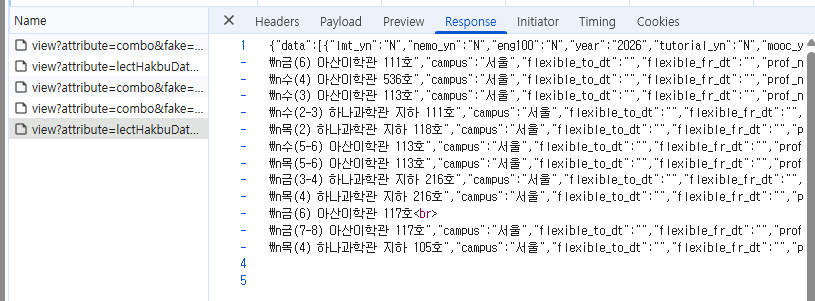
리스폰스가 이런식으로 들어온다.
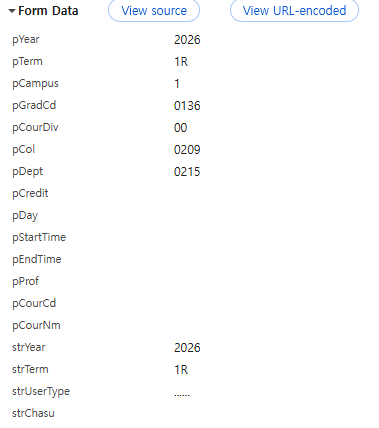
페이로드는 이렇게생겼다.
pCol은 단과대
pDept은 학과
젬민아 코드 작성해줘!
import json
import requests
import time

# 1. 이전 단계에서 저장한 학과 목록 불러오기
def load_department_data(file_path):
    with open(file_path, 'r', encoding='utf-8') as f:
        return json.load(f)

# 2. 단과대 코드 맵핑 (단과대명으로 코드를 찾기 위함)
# 만약 university_data.json에 단과대 이름:코드 쌍이 있다면 그걸 쓰셔도 됩니다.
def load_college_map(file_path):
    with open(file_path, 'r', encoding='utf-8') as f:
        data = json.load(f).get('data', [])
        return {item['name']: item['code'] for item in data}

college_map = load_college_map('univ.json')
dept_tree = load_department_data('dept.json')

# 3. API 설정
url = "https://sugang.korea.ac.kr/view?attribute=lectHakbuData&fake=1769250875465"
headers = {
    "Accept": "application/json, text/javascript, */*; q=0.01",
    "Content-Type": "application/x-www-form-urlencoded; charset=UTF-8",
    "X-Requested-With": "XMLHttpRequest",
    "User-Agent": "Mozilla/5.0 (Windows NT 10.0; Win64; x64) AppleWebKit/537.36 (KHTML, like Gecko) Chrome/120.0.0.0 Safari/537.36",
    "Referer": "https://sugang.korea.ac.kr/view?attribute=lectList&lang=KOR"
}

final_university_data = {}

# 4. 순회 시작
for college_name, departments in dept_tree.items():
    college_code = college_map.get(college_name)
    if not college_code:
        continue

    final_university_data[college_name] = {}
    print(f"\n🚀 [{college_name}] 과목 수집 시작...")

    for dept in departments:
        dept_name = dept['name']
        dept_code = dept['code']

        print(f"  - {dept_name} ({dept_code}) 조회 중...", end=" ", flush=True)

        # 페이로드 구성
        # pCol: 단과대코드, pDept: 학과코드
        payload = {
            "pYear": "2026",
            "pTerm": "1R",
            "pCampus": "1",
            "pGradCd": "0136",
            "pCourDiv": "00",
            "pCol": college_code,
            "pDept": dept_code,
            "pCredit": "",
            "pDay": "",
            "pStartTime": "",
            "pEndTime": "",
            "pProf": "",
            "pCourCd": "",
            "pCourNm": "",
            "strYear": "2026",
            "strTerm": "1R",
            "strUserType": "......",
            "strChasu": ""
        }

        try:
            # 과목 리스트 요청
            response = requests.post(url, data=payload, headers=headers)

            if response.status_code == 200:
                subject_data = response.json().get("data", [])
                final_university_data[college_name][dept_name] = subject_data
                print(f"✅ {len(subject_data)}개 과목 완료")
            else:
                print(f"❌ 실패 (코드: {response.status_code})")

        except Exception as e:
            print(f"⚠️ 에러: {e}")

        # 서버 매너 타임
        time.sleep(0.4)

# 5. 최종 결과 저장
with open("final_course_data.json", "w", encoding="utf-8") as f:
    json.dump(final_university_data, f, ensure_ascii=False, indent=4)

print("\n✨ 모든 단과대/학과별 과목 데이터 수집이 완료되었습니다!")
이때는 url이 바뀐다!! #3 api 설정에서 header를 보고 바뀐 url을 새로 복사해서 넣어줘야 한다. 이것때메 헤맷다..ㅠㅠ
이제 기다리면된다.
끝.